THAT SYNCING FEELING
Summary: Completely re-vamped sync circuit for GreenAntz: "
Sync for all occasions".
BACKGROUNDSome people have contacted me recently with sync issues, which boiled down to sync polarity.
One person was using an Nvidia card with it's built-in 320x240p mode, which appears to defaults to a mixed positive/negative. Fortunately this can be altered in the setup (to negative/negative) and seems to have worked for them.
Another was using Batocera setup (cloned) onto a similar PC with an unknown onboard GPU. Many variables in play, but again it seemed the issue was with the sync polarity setup.
These cases are rare (negative/negative sync is more common, or positive/positive), but highlighted to me that GreenAntz sync circuit had an issue with *mixed* sync polarities.
So I set myself to designing a better sync circuit for GreenAntz 2.3+.
STATE OF PLAYI tested various transcoders with different sync polarity combinations, and prepared this summary table:

Csync "pure" refers to csync input only (VGA pin 13), with no incidental vertical sync (VGA pin 14).
Csync "CRTEMU" refers to composite sync via CRT_emulator software, which does not blank out the Vsync line signal on pin 14. This is not a bug as such, and other software may have the same issues. I did have some success getting GreenAntz to automatically process this csync anyway, but it always came at the cost of not recognising positive polarity sync input (refer table). Otherwise, the only way to make any transcoder work was to disconnect or blank the vsync (GreenAntz has an override switch).
Bitfun uses the
Tomi Engdahl sync circuit (more on that below), so it managed to sync with all polarity combos, though it failed on composite input of either kind.
I have a couple of Wakabas. My newer Wakaba (2.3) managed with composite sync input (pure), but failed with csync input via CRTEMU. There is no override switch. It failed on mixed polarity sync input. Mine is a few years old now, there may be newer Wakabas available now.
GreenAntz similarly failed on mixed polarity sync input. Most versions also recognise csync input, though this sometimes requires the override switch (depends on version).
All transcoders worked OK with double negative sync input.
The line at the bottom (highlighted in CYAN) is the new sync circuit I'm developing, which outperforms all of them.
NEW "SYNC FOR ALL OCCASIONS" CIRCUITI'm developing a new GreenAntz sync circuit which will be roughly on
Tomi Engdahl's (below), but with a few key innovations/improvements.
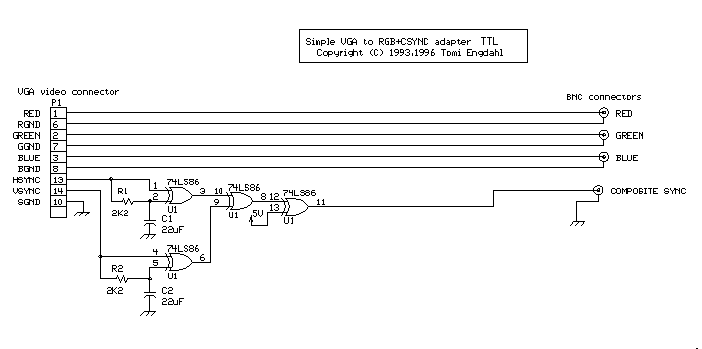 Firstly
, it will work with all sync input polarity permutations, per the original, PLUS composite sync.
Secondly, it will support a sync signal indicator LED, which will only light when a sync signal is present. This will be a more consistent and clear signal indicator than the sync LED on current GreenAntz versions.
Thirdly, it will
BLOCK higher frequency signals (VGA, 31khz+) automatically (optional, but on by default). I hope so anyway, because I haven't tested this last part yet

If I can pull this last part off then it will protect TVs from potential damage from higher frequency input. This would be a significant improvement and allow GreenAntz to function similarly to Buttersoft's 15khz dongle, or a JPAC.
PROGRESSThe new basic sync circuit will use more logic gates (4 vs 2 previously), but those four logic gates/comparators can be included in a single chip, the CD74HCT86.
I already had some of these ICs in a SOIC-14 package, which is for SMD (surface mount). That makes it difficult to prototype with, so I've soldered it onto a breakout board, then inserted pins at the provided 2.54m spacing, which is ideal for use with standard breadboard.


Then all I had to do was to plug in the various components for testing.
 NEARLY COMPLETE
As you can see from below, the circuit works fine and generates correct horizontal and vertical (circled in red) sync pulses.

The circuit has been modified/improved so that it also accepts composite sync input correctly, in addition to all +/- permutations.
The blue sync LED only lights when a horizontal signal is detected.
I've already incorporated the above into ongoing GreenAntz design, both schematic and PCB.
I am still working on a
active filter to block VGA 31khz+ signals, but this will require an op-amp. I will have to wait until some parts arrive and I can test further.
In addition to the quad logic and op-amp ICs, I'll also be using one (or two) Schmidt-trigger logic comparator buffers to bring the signals back to a nice square wave after all the filtering.
The new sync circuit will use a bit more space than the old. Part of the challenge is not moving the sync LED, as that would throw Ond's enclosure designs into disarray

Aiming to include all of these improvements, and the enclosure, included with the next GreenAntz v2.3!


 Home
Home Help
Help Search
 Login
Login Register


 Send this topic
 Print
Print Topic: GreenAntz RGB to component transcoder (Read 963379 times)


