Hello All,

I myself, as do alot of others here on BYOAC like to use the Griffin Powermate
http://www.griffintechnology.com/products/powermate/ for a volume knob. Those that use it, know why.
Well, after using it for a while, we have all known it to be only about 85% reliable when booting up or restarting our jukeboxes.

You have to unplug then replug it in, sometimes 2-3 times for it to work.

.
Well, after some research on another forum, the name escapes me right now, I did some tweaking with the drivers. I recommend the older Griffin PM 1.5.3 drivers
http://www.griffintechnology.com/software/0000/0044/PowerMate_Win_1-5-3_D.exe. The older drivers seem to work better.
The Griffin PM looks like it was primarily used for a MAC and the MAC users seem to not have any issues, but the Windows users seem to have the problems. Well, its because where Griffin installs the drivers.
So here is what I did:
Unplug the Griffin Powermate
Then open up the Device Manager (we should know how to get there)
You'll see it's under the USB Human Interface Device, Right Click for Properties

It says Location 0 (Griffin Powermate) That way you know you have the right one.
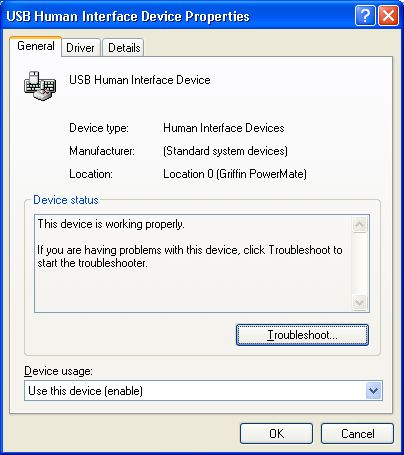
Then Select Driver

The Select Uninstall

Click OK
After you uninstall the drivers, close out the device manager, then reopen it, you'll see it's gone.

IMPORTANT!! now replug in the Griffin Powermate. The New Hardware Wizard will show up.

Select No, not at this time then click next

Then select Install from a list or specific Location (Advanced), click next
Then Follow the steps

Click Have Disk

Click Browse
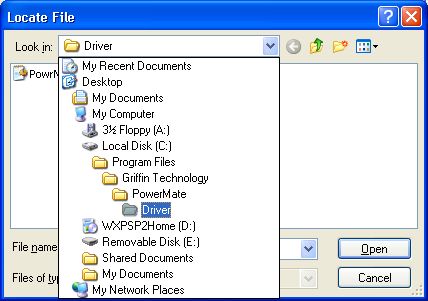
When the Griffin Powermate was originally installed, it installed to c:\program files\Griffin Technology\Powermate\Driver

There you will find Powrmate.inf select it

Click OK
Then you will see the Griffin Powermate show up in the Hardware Update Wizard box
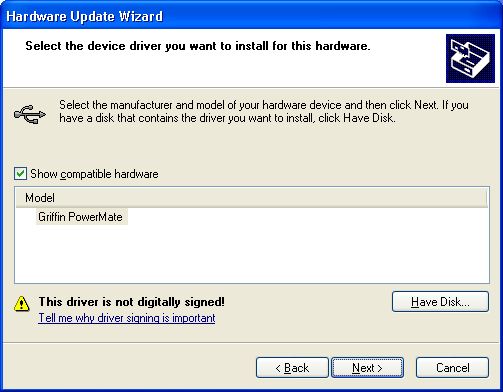
Select Next

Select Continue Anyway
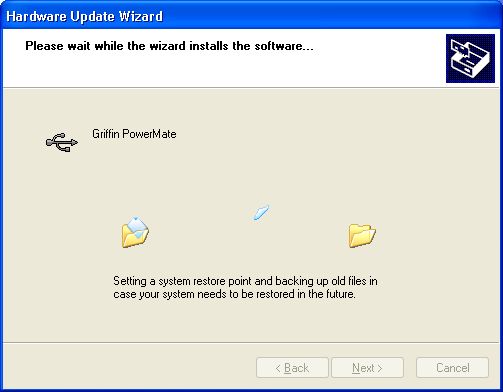
You'll see the files transfering

Then you'll see the install complete. click Finish. Your Griffin Powermate should be on.
Now close Device Manager, then reopen it. You should now see that the Griffin Powermate is listed under Universal Serial Bus Controllers

Click on Griffin Powermate and then right click properties. Select Drivers.
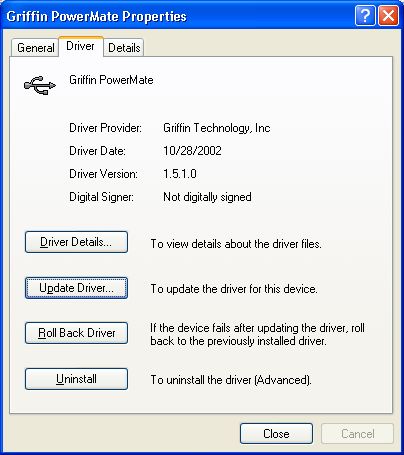
You'll see that the drivers are now from Griffin Technology, Inc instead of the generic Microsoft USB Human interface device as we saw earlier.
Now your Griffin Powermate should start everytime!
Go ahead, restart your jukebox, during the restart, you'll see the Griffin Powermate pulsesate then it will go dim, then Start right up! I have done about 60 restarts and have been testing for the last 45 days a cold boot every morning. So thats about 105 restarts or boots with a 100% Griffin Powermate start up. I Believe the problem is solved!

I hope this helps those that use the Griffin Powermate and to those that want to use one. You can find them on ebay for about $20 (US) used or $32 (US) new plus shipping. Lets keep this secret between us jukeboxers so the Powermates dont dissappear from ebay so cheaply.
Fordman


 Home
Home Help
Help Search
 Login
Login Register


 Send this topic
 Print
Print Topic: Griffin Powermate install tutorial ...Pics fixed 4/11/11 (Read 25822 times)


