I purchased a Happ3 trackball as well as the Happ3 to U-Trak and U-Trak to USB adapters (links below). I installed per the images but all I get is a right click of the mouse, a little X-axis movement, and no y-axis movement. I've confirmed that each axis on the Happ trackball is receiving a solid 5V. I also noticed that nothing works unless I plug in both harnesses.
The wierd part is the right click of the mouse.
- With the wires connected as shown in your picture, the right mouse button input pin is not connected.
- Either something shorted that pin to logic low (ground)
or the three pin connector was shifted one position and the logic low came from the X1 data line.
Ultimarc encoder pinout:
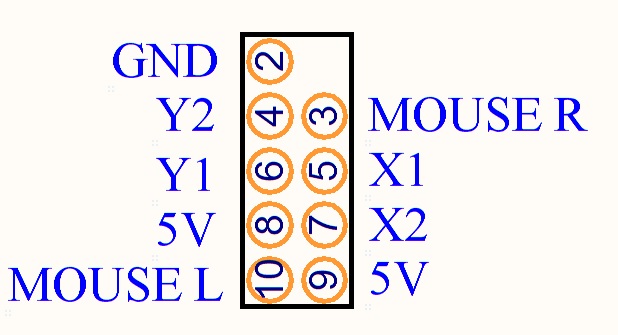
Happ trackball Molex connector wiring:
(black) Gnd 1 4 Y2 (green)
(red) +5V 2 5 X2 (blue)
(yellow) Y1 3 6 X1 (purple)

In order for the red boards on the trackball to work properly, they need 5v, ground, and the two data lines.
With power off (unplug encoder USB), use your multimeter in ohms mode to check if all eight lines are properly connected between the encoder and the trackball red boards. (NOTE: Both red board pin 3 grounds connect to the encoder pin 2 ground.)
- For example, the green wire on pin 5 of the encoder (X1) should be connected to pin 1 of the X-axis red board.
If the wiring is all correct, the trackball should work.
If it doesn't, check the data lines. Set your multimeter to Volts DC and plug in the USB so there's power to the encoder and red boards.
- When you slowly move the trackball, you should see each data line alternate between logic high (near 5v) and low (near 0v) as the encoder wheel turns, blocking and un-blocking the optos to generate a quadrature waveform like this.

If one of the data lines is stuck high or low, check if one of the two IR LEDs on the board is burned out.
- Use your cel phone/digital camera to see if the LEDs are lighting -- the wavelength can't be seen by the human eye, but can be seen by a digital camera.


Scott
EDIT: Added info about the multimeter setting and connecting the USB for testing the data lines.

No power to the red boards ==> no logic highs/lows on the data lines as the optos are blocked/unblocked by the encoder wheel.


 Home
Home Help
Help Search
 Login
Login Register


 Send this topic
 Print
Print Topic: Golden Tee Setup - Happ3 to UTrak to USB Issues (Read 15189 times)


