Build Your Own Arcade Controls Forum
November 21, 2009, 08:36:15 AM *
Welcome, Guest. Please login or register.

Login with username, password and session length
News:  
 
   Home   Help Arcade Search Login Register  

 
Main Woodworking Reviews Software Monitor/Video
Audio/Jukebox/MP3 Project Announcements Artwork Consoles Buy/Sell/Trade
Arcade Miscellaneous Everything Else Politics n Religion Forum Discussion Wiki Discussion
DOS/WinCab PowerMAME SK Jukebox UncleTs Jukebox Project Arcade
Linux Restorations Pinball MaLa Frontend  
 
Recent posts | Arcade | Rules | Old Boards | Old Archives | Chatroom | Wiki | File Repository | RSS


Pages: [1] 2  All   Go Down
  Send this topic  |  Print  
Author Topic: How to make a Top Mount or Under Mount Joystick Jig  (Read 24981 times)
0 Members and 1 Guest are viewing this topic.
Timoe
Trade Count: (+2)
Full Member
***
Offline Offline

Posts: 1662


Team-Oh-tAy-Oh


View Profile WWW
« on: March 07, 2006, 10:36:44 PM »

Here is a tutorial on how to make a jig for your router that will allow you to make perfectly snug recesses for your joysticks whether top mounted or under mounted.  It is some what complicated but it’s worth the effort if you think you will make more than one control panel out of wood.

This jig will be compatible with; Happ joysticks, Wico joysticks, X-arcade, and Pelican Real Arcade sticks.

Here is what you will need:

(1) 2’ x 4’ piece of ¼” hard board (mdf)
Router
Flush trim router bit (you bought this to trim your formica laminate)
Router Bushing
Hinge Mortising Router Bit (a very common straight bit)
Carpet tape
Drill and regular drill bits
Jig Saw

Start by inserting the router bushing into the base plate of your router.  Install the hinge mortising (common straight) bit into your router.  With your router unplugged, measure the distance from the cutting edge of the bit to the OUTSIDE of the bushing.


* joystick jig 1.jpg (114.66 KB, 778x583 - viewed 977 times.)
« Last Edit: March 08, 2006, 08:33:14 PM by timoe » Logged
Timoe
Trade Count: (+2)
Full Member
***
Offline Offline

Posts: 1662


Team-Oh-tAy-Oh


View Profile WWW
« Reply #1 on: March 07, 2006, 10:39:48 PM »

Next measure the distance from your router bit to the outside of your router base.  Now add two inches to that measurement to account for your clamps.

Lets not make the same mistake we made with our sawboard Wink


* joystick jig 2.jpg (112.29 KB, 778x583 - viewed 559 times.)
Logged
Timoe
Trade Count: (+2)
Full Member
***
Offline Offline

Posts: 1662


Team-Oh-tAy-Oh


View Profile WWW
« Reply #2 on: March 07, 2006, 10:43:39 PM »

Take your handy panel (2


* joystick jig 3.jpg (142.69 KB, 778x583 - viewed 500 times.)
Logged
Timoe
Trade Count: (+2)
Full Member
***
Offline Offline

Posts: 1662


Team-Oh-tAy-Oh


View Profile WWW
« Reply #3 on: March 07, 2006, 10:49:33 PM »

Now take your joystick base and line it up with the cross you just made.  You will then outline your joystick base in pencil.

Next add the first measurement you took from the cutting edge of your bit to the outside of the bushing. 

Mark these lines onto the handy panel.


* joystick jig 4.jpg (99.5 KB, 778x583 - viewed 504 times.)

* joystick jig 5.jpg (175.12 KB, 778x583 - viewed 527 times.)
Logged
Timoe
Trade Count: (+2)
Full Member
***
Offline Offline

Posts: 1662


Team-Oh-tAy-Oh


View Profile WWW
« Reply #4 on: March 07, 2006, 10:51:14 PM »

Now take the 2


* joystick jig 6.jpg (111.88 KB, 778x583 - viewed 743 times.)

* joystick jig 7.jpg (78.38 KB, 778x583 - viewed 701 times.)
Logged
Timoe
Trade Count: (+2)
Full Member
***
Offline Offline

Posts: 1662


Team-Oh-tAy-Oh


View Profile WWW
« Reply #5 on: March 07, 2006, 10:57:25 PM »

Now we need to cut out the inside of this square.  Be sure to leave about 1/8


* joystick jig 8.jpg (105.37 KB, 778x583 - viewed 779 times.)
Logged
Timoe
Trade Count: (+2)
Full Member
***
Offline Offline

Posts: 1662


Team-Oh-tAy-Oh


View Profile WWW
« Reply #6 on: March 07, 2006, 11:00:09 PM »

Here are the lines I will cut with my jigsaw.  I'm really just trying to take out the bulk of the waste so my router wont have to work so hard.


* joystick jig 9.jpg (125.89 KB, 778x583 - viewed 897 times.)

* joystick jig 9.1.jpg (120.67 KB, 778x583 - viewed 947 times.)
« Last Edit: March 08, 2006, 08:28:48 PM by timoe » Logged
Timoe
Trade Count: (+2)
Full Member
***
Offline Offline

Posts: 1662


Team-Oh-tAy-Oh


View Profile WWW
« Reply #7 on: March 08, 2006, 08:31:17 PM »

Now flip the thing over and get out a flush trim bit.  I put my joystick jig ontop of some 2x4s to give me clearance underneath and clamped it all down to my workbench.

Let the bearing of the router bit ride against the 2" strips underneath.

viola  Shocked


* joystick jig 9.2.jpg (99.32 KB, 778x583 - viewed 1008 times.)
Logged
Timoe
Trade Count: (+2)
Full Member
***
Offline Offline

Posts: 1662


Team-Oh-tAy-Oh


View Profile WWW
« Reply #8 on: March 08, 2006, 08:32:39 PM »

I trimmed up my piece's outside edges to a nice even square with enough room for my clamps.


* joystick jig 9.3.jpg (127.07 KB, 778x583 - viewed 1078 times.)
Logged
Timoe
Trade Count: (+2)
Full Member
***
Offline Offline

Posts: 1662


Team-Oh-tAy-Oh


View Profile WWW
« Reply #9 on: March 08, 2006, 08:34:17 PM »

Try out a test cut.

You can see the offset here to account for the bushing.


* joystick jig 9.4.jpg (128.8 KB, 778x583 - viewed 1249 times.)
Logged
Timoe
Trade Count: (+2)
Full Member
***
Offline Offline

Posts: 1662


Team-Oh-tAy-Oh


View Profile WWW
« Reply #10 on: March 08, 2006, 08:37:23 PM »

Some finished shots of the recess.

As you can see I made mine tight.  I like it that way and it will make it nice and clean when I want to top mount (like a kneivel CP) but you can make it more loose if you like.

My joystick base has to be pressed in.  Not forced, just neatly pushed in place.

As you can see I'm hanging it upside down without fasteners and it is perfectly snug.


* joystick jig 9.5.jpg (128.81 KB, 778x583 - viewed 907 times.)

* joystick jig 9.6.jpg (141.98 KB, 907x680 - viewed 777 times.)

* joystick jig 9.7.jpg (117.7 KB, 778x583 - viewed 999 times.)

* joystick jig 9.8.jpg (155.18 KB, 778x583 - viewed 1531 times.)
« Last Edit: March 08, 2006, 09:25:08 PM by timoe » Logged
Timoe
Trade Count: (+2)
Full Member
***
Offline Offline

Posts: 1662


Team-Oh-tAy-Oh


View Profile WWW
« Reply #11 on: March 08, 2006, 08:42:45 PM »

How do you use the Jig?

The router base slides along the top of the jig.  With the bushing installed in the base and the straight bit installed in your router, set the router on top of the jig at the edge of your piece.  Adjust your router's cutting depth.  I left 1/4" of material left.

Turn your router on and carefully let the bit go into the open space of your joystick hole.  Then push the router out towards the edge of your jig until the bushing makes contact with the inside edge of the jig.  While maintaining contact from the bushing to the jig edge run it around the full perimeter of the recess.

Then continue routing to clean up the rest of the mess.
Logged
NiteWalker
Trade Count: (0)
Full Member
***
Offline Offline

Posts: 787


Routers can do anything.


View Profile
« Reply #12 on: March 21, 2006, 04:12:09 PM »

Good stuff! With the router being my fav tool to work with I use a lot of similar methods in my stick building. If a template makes a job easier, a template is made!
Logged


My Woodworking and Crafts Blog

It's 9am. I'm calling it a nite.
Minwah
Trade Count: (+2)
Full Member
***
Offline Offline

Posts: 7301


View Profile WWW
« Reply #13 on: March 22, 2006, 10:19:56 AM »

Nice Smiley

Just a general tip also...keep making sure the router chuck is tight!  I routed the underside of my stick panel to give some extra joystick height, and on the second player side the router gradually loosened, and when I looked it had routed all the way through in places...as you can imagine I was a tad pissed off.

I managed to fix it by cutting out the hole completely, routing a bigger rectangle from the top and mounting a metal plate into it for the stick to bolt to.
Logged

nostrebor
Not enough wit to effectively use this space...
Wiki Contributor
Trade Count: (+6)
Full Member
***
Offline Offline

Posts: 1438


SHOCKING!!


View Profile
« Reply #14 on: March 22, 2006, 10:28:38 AM »

Excellent write up! Needs to be stickied.
Logged
Grauwulf
Trade Count: (0)
Full Member
***
Offline Offline

Posts: 341


Button Masher


View Profile
« Reply #15 on: July 28, 2006, 07:23:31 AM »

 We're not worthy! I agree, this needs to be made a sticky.

Now that I've seen how easy it is to make a template i think I will be making one to recess my trackball plates as well.
Logged

www.wolfelectronics.ca

Cap Kits for Canadians!
Howard_Casto
Idiot Police
Trade Count: (+1)
Full Member
***
Offline Offline

Posts: 6367


Your post's soul is mine!


View Profile WWW
« Reply #16 on: August 14, 2006, 03:48:00 AM »

I like the jigg making tutorial as it's useful for those who aren't used to making such things but isn't this a tad overkill?

It doesn't matter if the recess your joystick fits in is sloppy or not.  As long as it fits in the recess you are good.  Seems like an awful lot of work for something that's on the bottom side of your cp and thus nobody is ever gonna see. 
Logged

Timoe
Trade Count: (+2)
Full Member
***
Offline Offline

Posts: 1662


Team-Oh-tAy-Oh


View Profile WWW
« Reply #17 on: August 14, 2006, 07:48:39 AM »

I like the jigg making tutorial as it's useful for those who aren't used to making such things but isn't this a tad overkill?

It doesn't matter if the recess your joystick fits in is sloppy or not.  As long as it fits in the recess you are good.  Seems like an awful lot of work for something that's on the bottom side of your cp and thus nobody is ever gonna see. 

For the particular project this template was made for, people do see the underside because the bottom is made of plexiglass.

And I was able to use a similar jig for my more recent 4 player panel with 5 joysticks.  having a template SEVERELY reduced the assembly time.

But I agree, if you only plan on building 1 control panel in your life time, then making a jig is a waste of time.

But I enjoy the work  Cheers!


* plexi bottom 1up.jpg (157.65 KB, 778x583 - viewed 1137 times.)
« Last Edit: August 14, 2006, 07:55:55 AM by Timoe » Logged
Howard_Casto
Idiot Police
Trade Count: (+1)
Full Member
***
Offline Offline

Posts: 6367


Your post's soul is mine!


View Profile WWW
« Reply #18 on: August 14, 2006, 09:57:49 AM »

Ahh, I see why you needed it then.  Grin

Actually unless you are doing the steps backwards it shouldn't effect construction time at all.  Your paper template should have a joystick-sized hole with an x on it to mark it's center.  Once you have it on the piece of wood you place the joystick base upside-down on the top of the cp.  Center the joystick with the x, mark your bolt holes and drill all the holes.  Now you simply flip it over, line up with the holes and trace the outline of the base.  Now route the heck out of it. 

This method should actually be quicker for most people as the common layout templates have a hole or center point marking the area where the joystick should be rather than a outline of the base (plus different joysticks have different base sizes).  It's much more difficult to figure out where the joystick shaft will end up when you are using your style of template than to simply drill the shaft hole first and then route the recess. 

Again though, I think in general a jigg making tutorial needed to be on here though so good work. 

Now if you were to expand upon the idea and make jiggs of various common layouts (to enable a person to only use the router and eliminate those tiresome drill bits for the button holes)  then that might be more useful and time saving.  Of course then you have to drill holes for the buttons anyway to get the trim bit in, so it might be more trouble than it's worth. 
Logged

Ed_McCarron
Don't deliver any pizzas to I. C. Weiner
Trade Count: (0)
Full Member
***
Offline Offline

Posts: 1828


Get your mind out of the gutter. THIS is a dongle.


View Profile
« Reply #19 on: August 14, 2006, 11:36:29 AM »

Ahh, I see why you needed it then.  Grin

Actually unless you are doing the steps backwards it shouldn't effect construction time at all.  Your paper template should have a joystick-sized hole with an x on it to mark it's center.  Once you have it on the piece of wood you place the joystick base upside-down on the top of the cp.  Center the joystick with the x, mark your bolt holes and drill all the holes.  Now you simply flip it over, line up with the holes and trace the outline of the base.  Now route the heck out of it. 

This method should actually be quicker for most people as the common layout templates have a hole or center point marking the area where the joystick should be rather than a outline of the base (plus different joysticks have different base sizes).  It's much more difficult to figure out where the joystick shaft will end up when you are using your style of template than to simply drill the shaft hole first and then route the recess. 

Again though, I think in general a jigg making tutorial needed to be on here though so good work. 

Now if you were to expand upon the idea and make jiggs of various common layouts (to enable a person to only use the router and eliminate those tiresome drill bits for the button holes)  then that might be more useful and time saving.  Of course then you have to drill holes for the buttons anyway to get the trim bit in, so it might be more trouble than it's worth. 

I think, what Howard is trying to say is "Thanks for the cool tutorial.", but for some reason its coming out "You're a moron and I know better."

EDit:  Gee, that sounded harsh.  Oh well.  My biggest problem with the router is making a jig so things actually look good.  Thanks again!
Logged

But wasn't it fun to think you won the lottery, just for a second there???
Howard_Casto
Idiot Police
Trade Count: (+1)
Full Member
***
Offline Offline

Posts: 6367


Your post's soul is mine!


View Profile WWW
« Reply #20 on: August 14, 2006, 12:57:55 PM »

No it's thanks for the tutorial AND I know better.  No morons are involved though. 
Logged

nostrebor
Not enough wit to effectively use this space...
Wiki Contributor
Trade Count: (+6)
Full Member
***
Offline Offline

Posts: 1438


SHOCKING!!


View Profile
« Reply #21 on: August 14, 2006, 02:00:48 PM »

No it's thanks for the tutorial AND I know better.  No morons are involved though. 

According to thread police sources, an eyewitness has identified at least one moron. Smiley
Logged
NiteWalker
Trade Count: (0)
Full Member
***
Offline Offline

Posts: 787


Routers can do anything.


View Profile
« Reply #22 on: August 14, 2006, 05:44:29 PM »

Just wanted to show my template off that Timoe inspired me to make. With space being an issue in my shop, I make all of my templates small (this one is about 8" square) and fasten everything with double sided tape. I'm in love with the stuff now...

Also, while Timoe made his template for a tight fit, I sized mine to make about a 1/8" space all the way around. This allows for a bit of wiggle room. I made a set of templates for Sanwa joysticks too, but they're going to change so I won't show them just yet.

The template. I made mine out of 1/2" baltic birch plywood. I love how smooth and stable this stuff is. It's my template making material now. I like how the edges don't compress in whan I use a bearing guided bit (anyone who used an MDF template with a flush trim or pattern bit knows what I mean) and the fact that it can be had for pretty cheap if you know where to look. Here's a good source.


The finished recess.
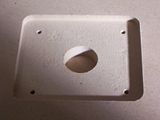

And making the template is not hard at all. Don't let it discourage you.

@Howard_Casto
"Now if you were to expand upon the idea and make jiggs of various common layouts (to enable a person to only use the router and eliminate those tiresome drill bits for the button holes)  then that might be more useful and time saving.  Of course then you have to drill holes for the buttons anyway to get the trim bit in, so it might be more trouble than it's worth. "

It is possible to rout the holes without drilling starter holes. All you need is a plunge boring router bit. It's designed to plunge into a workpiece just like a drill bit. That actually sounds like a good idea. Not as fun as using a drill press though! j/k
I just really want a drill press...


EDIT:
This needs to be stickied.
And you should post more of your jigs in here Timoe  Cheers!
« Last Edit: August 14, 2006, 05:48:03 PM by NiteWalker » Logged


My Woodworking and Crafts Blog

It's 9am. I'm calling it a nite.
nostrebor
Not enough wit to effectively use this space...
Wiki Contributor
Trade Count: (+6)
Full Member
***
Offline Offline

Posts: 1438


SHOCKING!!


View Profile
« Reply #23 on: August 15, 2006, 09:44:03 AM »

I like the jigg making tutorial as it's useful for those who aren't used to making such things but isn't this a tad overkill?

It doesn't matter if the recess your joystick fits in is sloppy or not.  As long as it fits in the recess you are good.  Seems like an awful lot of work for something that's on the bottom side of your cp and thus nobody is ever gonna see. 

But you are missing the point. This is a woodworking discussion forum. We woodworkers make jigs because it's fun to make jigs. They are made from wood. It's like a whole extra project. Plus, the joystick recesses don't look all free-hand sloppy and amatureish. They look machined and professional.

Now you may not ever see the recesses again, but I'm always having to take my cabinets apart to show friends how this stuff works. Then they want me to build them a CP or cabinet, and voila! I have the jigs already.
« Last Edit: August 15, 2006, 09:55:24 AM by nostrebor » Logged
Grauwulf
Trade Count: (0)
Full Member
***
Offline Offline

Posts: 341


Button Masher


View Profile
« Reply #24 on: August 15, 2006, 12:01:51 PM »

I am working on my second and third MAME cabinets right now. The jigs I will make based on this post will help me a lot.
Logged

www.wolfelectronics.ca

Cap Kits for Canadians!
mikevangels
Trade Count: (0)
Full Member
***
Offline Offline

Posts: 11


View Profile
« Reply #25 on: August 18, 2006, 03:00:25 PM »

*The router base slides along the top of the jig.  With the bushing installed in the base and the straight bit installed in your router, set the router on top of the jig at the edge of your piece.  Adjust your router's cutting depth.  I left 1/4" of material left.*


Okay... so I'm a router novice...  but with using one of these jigs how do you adjust the cutting depth?

Most of my router bits have a bearing on the bottom or top of the bit (though I'll admit I don't have many).  So as an example, if my router bit is 1" long and the bearing is at the top, it will cut a 1" depth.

I have  plunge router so I'm assuming I need a different type of bit? Or is this bushing something separate from the bit that attaches directly to the router?

*Edit*  Bah... after a couple re-reads I think I've got it.
« Last Edit: August 18, 2006, 03:12:30 PM by mikevangels » Logged
Timoe
Trade Count: (+2)
Full Member
***
Offline Offline

Posts: 1662


Team-Oh-tAy-Oh


View Profile WWW
« Reply #26 on: August 18, 2006, 09:57:27 PM »

Yes, the bushing attaches to the router base directly.  It has an edge the protrudes down that rides against the edge of your jig.  The router bit is the plain "hinge mortise' type bit that does not have a bearing.
Logged
AtomSmasher
I'm happy to fly below Saint's radar
Trade Count: (0)
Full Member
***
Offline Offline

Posts: 3404


I'd rather be rich than stupid.


View Profile WWW
« Reply #27 on: August 19, 2006, 11:33:06 AM »

Good stuff.  Now I just need to go buy a router bushing so I can actually use this info.  This thread should definately be stickied.
Logged

NiteWalker
Trade Count: (0)
Full Member
***
Offline Offline

Posts: 787


Routers can do anything.


View Profile
« Reply #28 on: August 19, 2006, 01:50:56 PM »

You don't absolutely need a bushing, you can also use what's called a pettern bit. Make your template out of 3/4" or 1/2" plywood instead of MDF. MDF's edges will compress from the router bearing. The math is simpler when using a pattern bit. The opening you see is what you get. Just make sure to get a pattern bit with a 3/4" cutting length. Any longer and it'll extend too far to make an appropriate recess for the joystick.
Logged


My Woodworking and Crafts Blog

It's 9am. I'm calling it a nite.
AtomSmasher
I'm happy to fly below Saint's radar
Trade Count: (0)
Full Member
***
Offline Offline

Posts: 3404


I'd rather be rich than stupid.


View Profile WWW
« Reply #29 on: August 19, 2006, 07:25:17 PM »

You don't absolutely need a bushing, you can also use what's called a pettern bit. Make your template out of 3/4" or 1/2" plywood instead of MDF. MDF's edges will compress from the router bearing. The math is simpler when using a pattern bit. The opening you see is what you get. Just make sure to get a pattern bit with a 3/4" cutting length. Any longer and it'll extend too far to make an appropriate recess for the joystick.
I'm guessing a pattern bit is basically just a flush trim bit with the bearing on the top instead of the bottom.  Is that correct?
Logged

NiteWalker
Trade Count: (0)
Full Member
***
Offline Offline

Posts: 787


Routers can do anything.


View Profile
« Reply #30 on: August 19, 2006, 07:27:53 PM »

Yep.Thems be the ones.
Logged


My Woodworking and Crafts Blog

It's 9am. I'm calling it a nite.
Grauwulf
Trade Count: (0)
Full Member
***
Offline Offline

Posts: 341


Button Masher


View Profile
« Reply #31 on: August 19, 2006, 07:52:27 PM »

I would still reccomend buying the bushing setup. If your router has a standard 1-3/16" opening with a recess in the baseplate for the bushings, the correct bushing and retaining ring will set you back about $10. I had to replace my baseplate with a universal one so I could use standard bushings and bought a full set of 9 different bushings, my cash outlay was about $50. But I have seen other kits much cheaper. A local place (Canadian Tire for the canucks on the board) has a full kit with 5 or 6 bushings with the universal 6" baseplate for about $20. The stuff I bought was from Lee Valley, excellent quality gear at a good price.

Baseplate: http://www.leevalley.com/wood/page.aspx?c=1&p=47162&cat=1,43000,51208&ap=1

Bushings: http://www.leevalley.com/wood/page.aspx?c=1&p=47249&cat=1,43000,51208&ap=1

In comparison, the pattern bits start at $23 or so at Lee Valley. Standard straight bits are about 1/2 that.

It's just my opinion, but bits wear out, the bushing kit will not.
Logged

www.wolfelectronics.ca

Cap Kits for Canadians!
NiteWalker
Trade Count: (0)
Full Member
***
Offline Offline

Posts: 787


Routers can do anything.


View Profile
« Reply #32 on: August 19, 2006, 07:58:32 PM »

Don't get me wrong, bushings are great. I have 2 sets. But some people have pattern bits already (from cutting other parts). So if you already have a pattern bit, you're good. I prefer the bushing method as well.

Also, here's where I get my routerbits:
http://www.routerbits.com/cgi-routerbits/sr.cgi?1156035299_17864+47

Super cheap and industrial quality. If you chack around on the woodnet forums the whiteside brand is preferable to others.
Logged


My Woodworking and Crafts Blog

It's 9am. I'm calling it a nite.
MPTech
Trade Count: (0)
Full Member
***
Offline Offline

Posts: 363


UltimateArcade completed!


View Profile
« Reply #33 on: March 31, 2007, 10:13:05 PM »

Nitewalker, thanks for the link.
Which bit would you recommend for this project? (part number please)

I've used a router many times for rounding an edge, but never routed a recess or used a template.
I'm still in the planning stage for my first custom CP, so this will be a tremendous help!


Thanks for the great tutorial!
Logged

MPTech
   Better living thru technology!   ;-)
NiteWalker
Trade Count: (0)
Full Member
***
Offline Offline

Posts: 787


Routers can do anything.


View Profile
« Reply #34 on: April 01, 2007, 07:23:10 AM »

No problem. I get my router bits from a different source now though. Same brand (whiteside) just cheaper, free shipping and a 10% off discount if you join woodnet (the code is woodnet10).

For the way the tutorial mentions I'd grab this one and a 1" outside diameter bushing.

The size of the router bit isn't critical so long as it's smaller than the bushing. The larger the combination you use the quicker the recess can be router.
Logged


My Woodworking and Crafts Blog

It's 9am. I'm calling it a nite.
(+_+)
Let me splain.
Trade Count: (0)
Full Member
***
Offline Offline

Posts: 575


For I am ]{eyser Soze


View Profile
« Reply #35 on: July 09, 2007, 10:55:22 AM »

Nice jig!

I just finished recessing my joysticks recently. I simply used the joystick plate to draw the square and 4 pieces of 1/2" X 3" which I double sided taped to the bottom of the cp. You need to line up your wood pieces just outside the lines to compensate for the router sleeve. Man does that tape hold well. Almost too well. It's a quick and dirty way to do it, but it works. I do prefer your jig though, especially if your going to pump out a lot of controllers.

Logged

This plan is so perfect, it's retarded. -- Peter Family Guy
Mallen
Trade Count: (0)
Jr. Member
**
Offline Offline

Posts: 9

Save Mikey


View Profile
« Reply #36 on: August 17, 2007, 03:57:39 PM »

Timoe,
   I plan on making one in a couple of days for my joysticks, thanks, this will be a good reference in case I get stuck.

Nice Smiley

Just a general tip also...keep making sure the router chuck is tight!  I routed the underside of my stick panel to give some extra joystick height, and on the second player side the router gradually loosened, and when I looked it had routed all the way through in places...as you can imagine I was a tad pissed off.

I managed to fix it by cutting out the hole completely, routing a bigger rectangle from the top and mounting a metal plate into it for the stick to bolt to.

Minwah,
   I think I know why your bit got loose.  I've seen a few post here with bad bit tightening technique.  The bit will loosen up if you drop it to the bottom and tighten it.  It does so by design. Actually the manufacturer (porter cable and delta) recommends that the bit be bottomed and then raised 1/16 inch before tightening.  This is because as you're tightening the bit, it moves down and squeezes, but if the bit is already seated on the bottom, I may stop before there is a good squeeze.  Make sense?  I've read this also in a woodworking magazine.  I know it's a small detail, but a loose bit is dangerous.  Also, check your bit chuck for cracks.  Hope that fixes future problems.   Cheers!
Logged
Gatsu
Trade Count: (0)
Full Member
***
Offline Offline

Posts: 700


I <3 Vewlix


View Profile
« Reply #37 on: August 19, 2007, 10:54:58 AM »

Maybe a stupid question...but I'll ask anyway.

How deep do you need to router for the different types of buttons & joystick plates?

I'm gonna be jumping between Happ and Sanwa parts. Making 1 for myself and a couple for some friends for X-mas. And they prefer jap parts...while I prefer happ.  Roll Eyes

or is there not really much difference?
Logged

Rusty
Trade Count: (0)
Full Member
***
Offline Offline

Posts: 106


Ow! Ow! Ow!


View Profile
« Reply #38 on: August 23, 2007, 10:03:40 PM »


The bit will loosen up if you drop it to the bottom and tighten it.  It does so by design. Actually the manufacturer (porter cable and delta) recommends that the bit be bottomed and then raised 1/16 inch before tightening.  This is because as you're tightening the bit, it moves down and squeezes, but if the bit is already seated on the bottom, I may stop before there is a good squeeze.


One of the better tips I've seen is to slip small O-rings onto the shanks of your bit and slide it all the way up to the top of the shank.  This keeps the bit a fraction of an inch above the collet and also protects the head of the bit from nicks that can occur on the cutting edges if the bit is dropped into the router.
Logged
Namco
Trade Count: (0)
Full Member
***
Offline Offline

Posts: 541


Now addicted to Williams pins... all of them.


View Profile WWW
« Reply #39 on: November 05, 2007, 10:43:51 PM »

On my control panel to recess the joystick a half inch, I used a dremel with the drywall cutting blade and the depth attachment to gouge out an extra 1/2" or so for my stick. It worked pretty well and greatly improved the look of the stick, but was extremely rough and looked like a monkey did it. Think I'll give this a try on my next CP... if I get a router, or unless I use that metal CP that's on my Dynamo cab.  Grin
Logged
Pages: [1] 2  All   Go Up
  Send this topic  |  Print  
 
Jump to:  

Powered by MySQL Powered by PHP Powered by SMF 1.1.10 | SMF © 2006-2009, Simple Machines LLC | Sitemap Valid XHTML 1.0! Valid CSS!
Page created in 0.768 seconds with 54 queries.
